 TIME
TIME


创建一个带有验证码的登录页面需要HTML、CSS以及JavaScript(可能还需要后端语言如PHP等来处理服务器端的验证逻辑)。以下是一个简单的带有验证码的登录页面的HTML示例。请注意,此示例仅包含前端部分,验证码的生成和后端验证需要额外的处理。
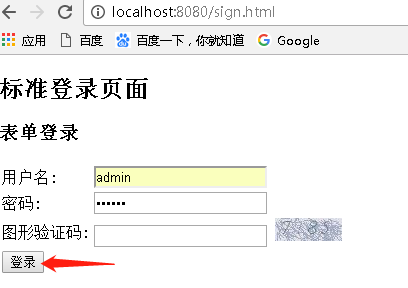
<!DOCTYPE html>
<html>
<head>
    <title>登录页面</title>
    <style>

    </style>
</head>
<body>
    <div class="login-container">
        <h2>登录</h2>
        <form id="loginForm" action="/login" method="post">
            <div class="input-group">
                <label for="username">用户名:</label>
                <input type="text" id="username" name="username" required>
            </div>
            <div class="input-group">
                <label for="password">密码:</label>
                <input type="password" id="password" name="password" required>
            </div>
            <div class="input-group">
                <label for="captcha">验证码:</label>
                <input type="text" id="captcha" name="captcha" required>
                <!-- 显示验证码图片 -->
                <img id="captchaImg" src="/captcha.php" alt="验证码">
            </div>
            <!-- 提交按钮 -->
            <button type="submit">登录</button>
        </form>
    </div>
</body>
</html>在这个例子中,你需要创建一个/captcha.php(或者其他你设置的路径)来处理验证码的生成和显示,当用户提交表单时,你也需要在服务器端验证用户输入的验证码是否正确,这通常涉及到比较用户输入的验证码和你之前生成的验证码,具体的实现方式取决于你使用的服务器端语言和框架,如果你使用PHP,你可以使用各种库和函数来生成和验证验证码,如果你使用的是其他语言,如Python或Node.js,也有相应的库可以帮助你实现这个功能。